
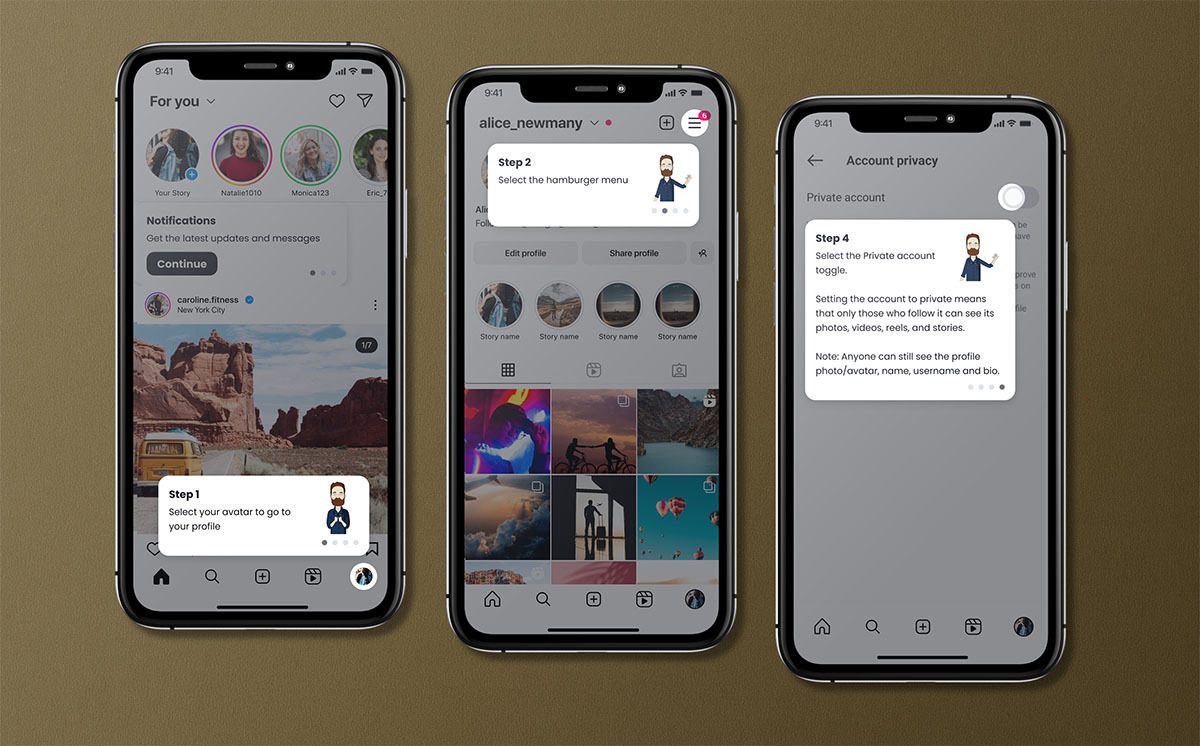
As part of a course for parents of teenagers starting high school that I created for one of my Graduate Certificate assessments, I developed an interactive product walkthrough-style activity to teach parents how to manage their child’s privacy and other settings on Instagram. Designed as an example of explicit instruction, this activity aims to bridge the knowledge gap for parents who may not be familiar with the platform, equipping them with the skills needed to collaborate with their child to ensure they have a positive, safe Instagram experience.
Note: A 20-minute video presentation located at the bottom of this page provides a detailed theoretical justification for this activity and outlines its integration within the proposed course.
My role on this project: Learning designer, developer, animator and editor.
Problem addressed: Many parents lack the technical knowledge to understand what their children do online and why, and have no idea how to help their child manage their online presence. This walkthrough simplifies the process of learning about the settings Instagram offers to manage privacy, visibility, and contact within the app, helping parents collaborate with their teen to make informed decisions about online safety.
Learning objective: By the end of this activity, learners will be able to apply Instagram’s settings to control an account’s content visibility and who can send messages to an account. They will be equipped to talk with their young person about the benefits and potential risks of the various settings and collaborate to guide them in maintaining a positive and safe Instagram presence.
Key features:
- Interactive product walkthrough in a simulated Instagram app environment.
- Step-by-step guide on adjusting privacy settings, restricting content visibility, and controlling who can send messages.
- Reflective prompts encourage parents to consider the settings from both their own and their child’s perspectives.
- Hands-on practice with immediate feedback to reinforce learning.
- Knowledge check quiz at the end to assess understanding and reinforce key concepts.
Technical implementation:
- The ‘fellow parent’ character introducing the activity was animated using Adobe Character Animator and voiced with TTSMaker.
- Developed in Articulate Storyline 360 due to its versatility in creating a visually engaging experience with completely customisable interactivity.
- Mobile-first design to meet the needs of the majority of parents who access the internet via smartphone.
Results:
- Empowers parents to confidently collaborate with their child to manage Instagram privacy and visibility settings.
- Increased engagement through an interactive and reflective learning approach.
Challenges and learning:
- Balancing simplicity with the complexity of Instagram’s privacy settings to ensure clarity for non-technical users.
- Developing a design that accommodates WCAG 2.0 AA standards, requiring creative solutions for accessibility.
- Managing ongoing maintenance to keep the walkthrough up-to-date with Instagram’s evolving interface.
Presentation
The following video presentation was a requirement of the assessment for which I completed this project. Note that it covers both the activity above and my ‘Having the hard conversations: Cyberbullying‘ branching-scenario activity.
The first ~10 minutes are intended as a presentation to my hypothetical manager, justifying my choice of learning theory, approach, and tools, and explaining how they align with the learning goal and the hypothetical Request for Proposal. It also discusses the strengths and weaknesses of my approach and how I intended to measure its impact and effectiveness.
The remainder of the video is a pitch to a hypothetical client, highlighting the benefits of working with me, explaining my chosen activities, and discussing their impact.